Geocoding
Turn a table of addresses, such as a CSV file, into a point layer. The Processing algorithm Geocode addresses looks for each address with the search of the geoportal, the one of the location search, and keeps the columns of the table.
Geocode a table
- Load the table. For a CSV file: Layer ▸ Add Layer ▸ Add Delimited Text Layer…, with No geometry (attribute only table) as Geometry Definition.
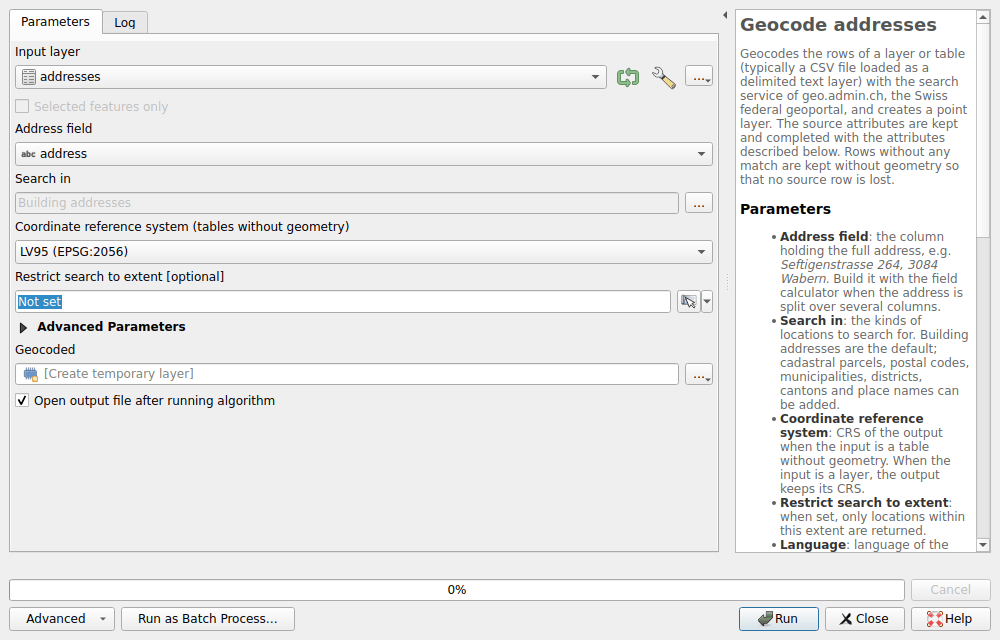
- Open Processing ▸ Toolbox, then Swiss Locator ▸ Geocoding ▸ Geocode addresses.
- Choose the table as Input layer, and the column holding the whole
address as Address field, such as
Seftigenstrasse 264, 3084 Wabern. - Click Run. The points are added to the map as Geocoded.
When the address is split over several columns, join them first with the
Field Calculator, for instance
concat("street", ' ', "number", ', ', "zip", ' ', "city").
The other parameters:
- Search in: building addresses by default. Parcels, postal codes, municipalities, districts, cantons and the names of the national map can be added.
- Coordinate reference system (tables without geometry): LV95 or LV03. A layer with a geometry keeps its own.
- Restrict search to extent: only the locations within it are found.
- Under Advanced Parameters, the Language of the labels, and the Pause between requests (milliseconds): see fair use.
The result
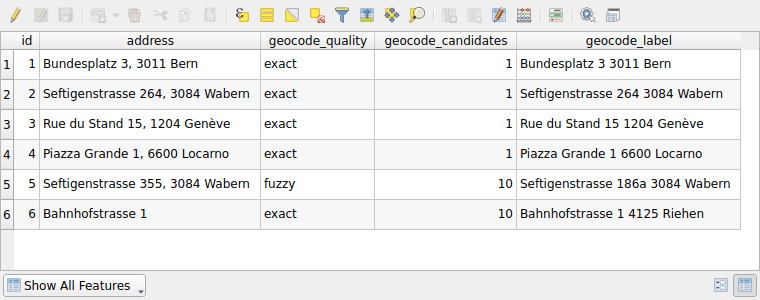
Each row gives a point, with the columns of the table and these attributes:
| Attribute | Content |
|---|---|
geocode_quality |
exact when every word of the address is in the location found, fuzzy otherwise |
geocode_candidates |
The number of locations found, up to 10. More than one means that the address is ambiguous: the best one is kept. |
geocode_label |
The location found |
geocode_detail, geocode_origin, geocode_feature_id, geocode_rank, geocode_weight |
The location as returned by the service. For an address, the feature id holds the EGID and EDID of the Federal Register of Buildings and Dwellings. |
A row without any location found, or whose request failed, is kept without a geometry: no row is lost. The log of the algorithm lists them.
Warning
The search is fuzzy: it almost always finds a location, even for a typo or
an address that does not exist. Check geocode_quality before trusting a
point. Above, there is no Seftigenstrasse 355 in Wabern: number 186a is
found and rated fuzzy. Bahnhofstrasse 1 is exact, but has 10
candidates: without a postal code or a locality, it could be any of them.
To be rated exact, a number of the address, such as the house number or the
postal code, must be in geocode_label. A word, such as the municipality or
the canton, can also be in geocode_detail.
The service searches up to ten words: only the first ten words of a longer address are sent.
Fair use
The services of geo.admin.ch are free of charge, subject to a fair use policy of about 20 requests per minute. The algorithm therefore pauses for 3 seconds between two requests: a thousand addresses take about 50 minutes. Identical addresses are requested only once.
A request that fails because of the network or of an overloaded service is tried again, up to three times. After five such failures in a row, the algorithm stops: the service is most likely down.
For larger tables, write to info@geo.admin.ch first, as the terms of use ask, or use the official directory of building addresses of swisstopo, a dataset of the data catalogue.
In models and scripts
The algorithm also runs in the model designer, in the batch processing interface, and from Python:
processing.run(
    "swiss_locator:geocodeaddresses",
    {"INPUT": layer, "FIELD": "address", "OUTPUT": "TEMPORARY_OUTPUT"},
)